
Business credit reporting
Let your on-time payment history build your business credit file with Experian.
What credit reporting does for you
Credit Reporting lets Electronic Payments report your payment history with us as a business tradeline to Experian. A tradeline is one account line on a credit file. Most small businesses pay on time and never get credit for it, because a bureau only knows about an account when someone reports it. This program is available only through Merchant360, at no cost.
Use it when you want your on-time record working for you: a loan, a lease, better supplier terms, or a business credit card. Lenders check Experian business reports, and a reported, on-time tradeline is what they want to see.
Before you start: only the account owner can open this page and enroll. Nothing is reported until you enroll, and reporting is optional. You can opt out at any time, which stops future updates to your tradeline.
What is reported is factual account data each month: your balance, whether you paid on time, and your account status, as they stand on your account. Enrollment does not guarantee any change to a credit score.
When it is set up, the Your current standing card on this page shows the same story Experian receives: Paid on time, the amount past due, or No balance owed, plus the last balance reported and when. Until the program launches you will see a notice that reporting launches soon. You can still enroll now, and reporting starts as soon as the program goes live.
If you do not see Credit Reporting in the menu, you are signed in as a teammate rather than the owner. Sign in as the owner or ask them to enroll.
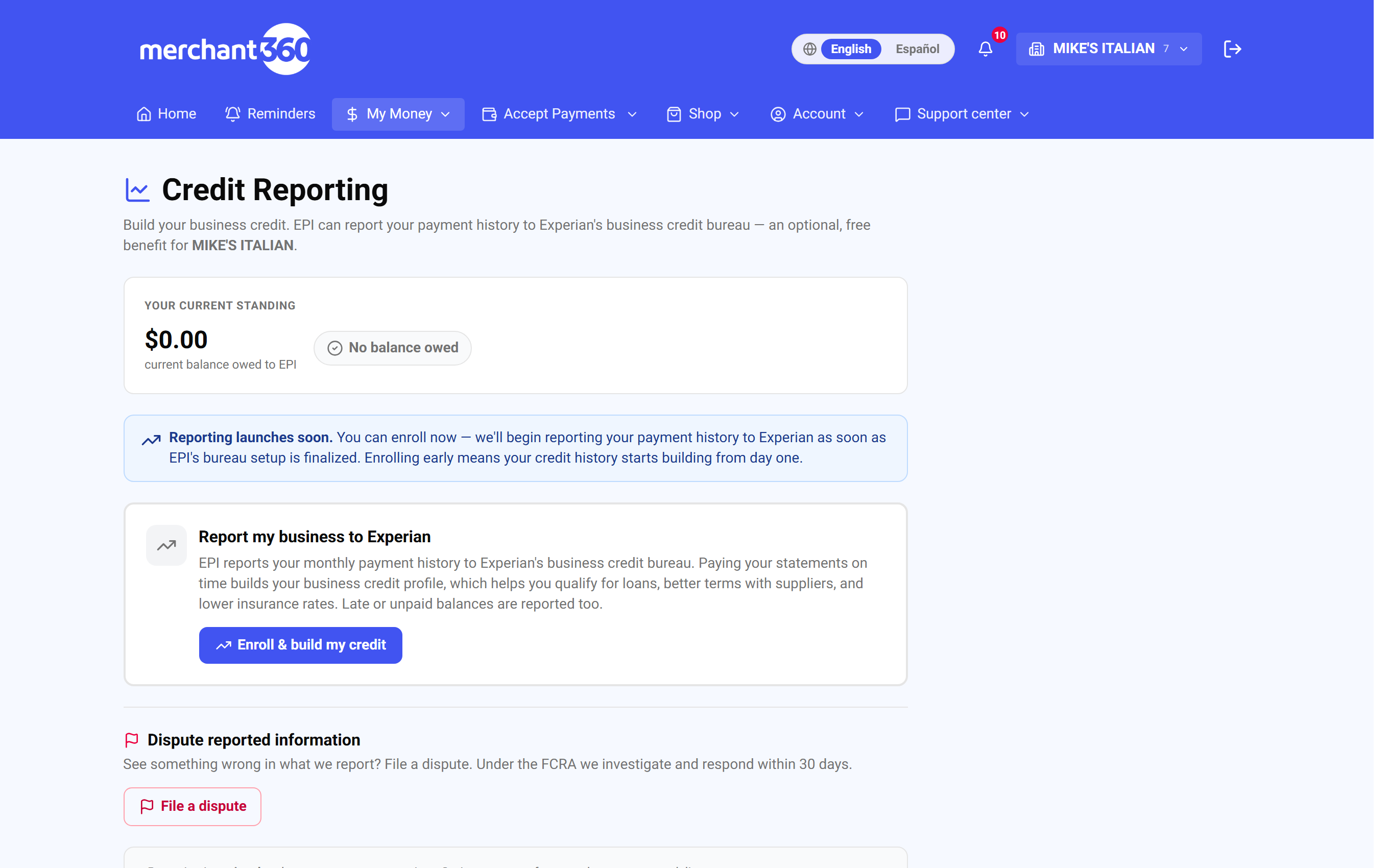
| On this screen | What it does |
|---|---|
| Your current standing | Shows how you are being reported right now: Paid on time, an amount past due, or No balance owed, with the last balance reported by EPI. Until the first statement is reported it reads No statement reported yet. |
| Reporting launches soon | A notice shown before the program is live. Enrolling now is allowed, and reporting of your history begins when the program launches. |
| Report my business to Experian | The enrollment card for your business tradeline. It shows Enrolled once you are in, with an Opt out button. |
| Also report the personal guarantor | Optional second card for accounts with a personal guaranty. It only reports the primary guarantor, and only after their typed consent. |
| Dispute reported information | Opens the dispute form for anything you believe is reported inaccurately. Your ten most recent disputes are listed below it with their status. |
Enrolling
Enrolling turns on business reporting. It is one click, and you can turn it off again from the same card. Guarantor reporting is a separate, optional step that needs the guarantor to type their own name as consent.
You need to be signed in as the account owner. If the account has a personal guaranty, the guarantor card appears under the business card; if it does not, only the business card is shown.
When you are done, the business card reads Enrolled and the standing card shows how you are being reported. If the standing shows past due, paying the balance updates the next report.
If you change your mind, click Opt out on the business card and confirm. Your existing tradeline stops updating, and guarantor reporting turns off with it. Withdraw consent on the guarantor card stops only the guarantor's personal tradeline.
- 1Open Credit Reporting from the menu (you must be signed in as the account owner).
- 2Review what will be reported: your business tradeline with Electronic Payments, including payment status.
- 3Click Enroll & build my credit. The card changes to Enrolled and an Opt out button appears.
- 4Optional: on the guarantor card, have the guarantor type their full legal name and click I consent. The card then shows Consent on file with a Withdraw consent button.
- 5Check the Your current standing card. It shows on time, or past due with the amount, which is exactly what is reported.
| On this screen | What it does |
|---|---|
| Enroll & build my credit | Enrolls your business tradeline. The card switches to Enrolled and reporting begins on the next cycle (or at launch). |
| Enrolled | Status shown on the business card once you are enrolled. |
| Opt out | Asks you to confirm, then stops reporting your business. Your tradeline stops updating and guarantor reporting turns off too. |
| Type the guarantor's full legal name | Text field on the guarantor card. The typed name, the date, and your IP address are recorded as the guarantor's consent. |
| I consent | Saves the guarantor's consent and turns on their personal tradeline. The card then reads Consent on file. |
| Consent on file | Status shown once guarantor consent has been recorded. |
| Withdraw consent | Stops guarantor reporting without touching the business tradeline. |
| Only the primary guarantor is reported | Note on the guarantor card: additional owners are not sent and no tradeline is created on their personal credit. |
The standing card is the same story Experian sees. If it says on-time, that's what your credit file is building. If it shows past due, clearing the balance updates the next report.
Disputes (your FCRA rights)
The dispute form is how you challenge anything we report about your business or the guarantor. Under the Fair Credit Reporting Act (FCRA) we investigate and respond within 30 days, and each dispute carries a response-due date so you can see the clock.
Use it when the standing card or a report shows something you believe is wrong: the balance, the past-due amount or aging, the account status, your business name or address, the guarantor's information, or an account that is not yours.
Each dispute is tracked with a status: Open, Investigating, then Resolved as corrected, verified accurate, tradeline deleted, or updated. The list under the form shows your ten most recent disputes with the filed date, the response-due date, and the resolved date.
If the dispute is resolved as verified accurate and you still disagree, file a new dispute with more detail about what the correct value should be. If you cannot pick Guarantor (personal), the account has no guarantor on file, so only the business tradeline can be disputed.
- 1Click File a dispute on the Dispute reported information card.
- 2Under What are you disputing?, choose Business tradeline or Guarantor (personal).
- 3Under Which fields are inaccurate?, tick every field that is wrong.
- 4In Tell us what's wrong, describe the inaccuracy and what it should be, then click Submit dispute.
- 5Watch the row in the list: it starts as Open, moves to Investigating, and ends with one of the Resolved statuses by the response-due date.
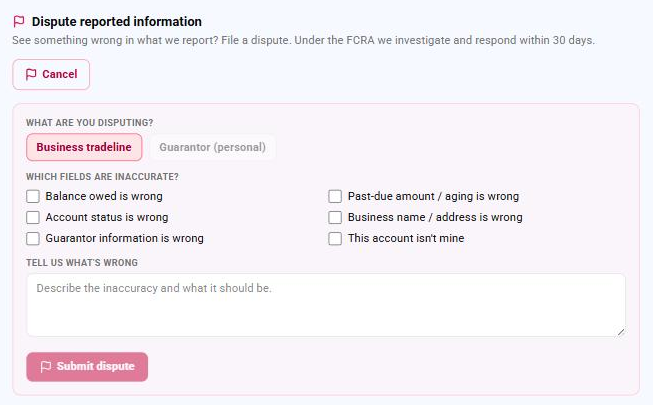
| On this screen | What it does |
|---|---|
| File a dispute | Opens the dispute form on the same page. |
| What are you disputing? | Choice between Business tradeline and Guarantor (personal). The guarantor option is only enabled when the account has a guarantor on file. |
| Which fields are inaccurate? | Checkboxes: Balance owed is wrong, Past-due amount / aging is wrong, Account status is wrong, Business name / address is wrong, Guarantor information is wrong, This account isn't mine. |
| Tell us what's wrong | Free-text box for the inaccuracy and what the correct value should be. |
| Submit dispute | Files the dispute. It appears in the list below as Open with a response-due date. |
| Cancel | Closes the form without filing anything. |
| Dispute list | Your ten most recent disputes, each labeled Business dispute or Guarantor dispute, with Filed, response due by, and resolved dates. |
| Status | Open, Investigating, Resolved – corrected, Resolved – verified accurate, Resolved – tradeline deleted, or Resolved – updated. |