
Estimates & e-signatures
Quote it, get it signed, turn it into an invoice – no back-and-forth.
Create an estimate
An estimate is a quote your customer can accept and sign online. Use it whenever the price needs a yes before the work starts: a job, a project, an order with options. Once accepted it converts into an invoice with every line carried over, so nothing is re-keyed.
The estimate builder is the invoice builder with two differences: a due date that works as the date the quote is good through (the estimate marks Expired after it), and Require a deposit to accept, which collects money at the moment the customer signs. Catalog items, per-line discounts, tax from the Bill To state, and customer notes all work the same way.
Go to Accept Payments → Estimates → New estimate. Under Bill To pick or type the customer, add your line items, set the tax and the good-through date, add any notes or terms, and choose the deposit: No deposit, a Flat amount ($), Percent of total (%), or paid in full. The form shows what the customer pays to accept. Save Draft to keep working, or Save & Send estimate to email it.
Done looks like this: the estimate page opens with status Sent, the customer has an email with the estimate and a link to review and sign, and the board's Open counter goes up. Your estimate number follows the prefix set under Settings → Invoice numbering.
If Save & Send estimate is greyed out, add a customer email. If tax is zero, check the Bill To state and your Tax rates. If the customer needs a different total, edit the estimate; unlike an invoice, a sent estimate can be resent with changes.
- 1Go to Accept Payments → Estimates and click New estimate.
- 2Under Bill To, pick an existing customer, or type a new name, email, and address. Turn on Save as new customer to reuse them later.
- 3Add your line items: description, quantity, and unit price. Pull from your catalog to auto-fill price and tax, or type a one-off line, and add a per-line discount or tax if needed.
- 4Set the tax rate and a due date (the date the quote is good through; the estimate marks Expired after it), and add customer notes or terms.
- 5Optionally require a deposit to accept: none, a flat amount, a percent, or paid in full. Save draft, or Save & send to email it.
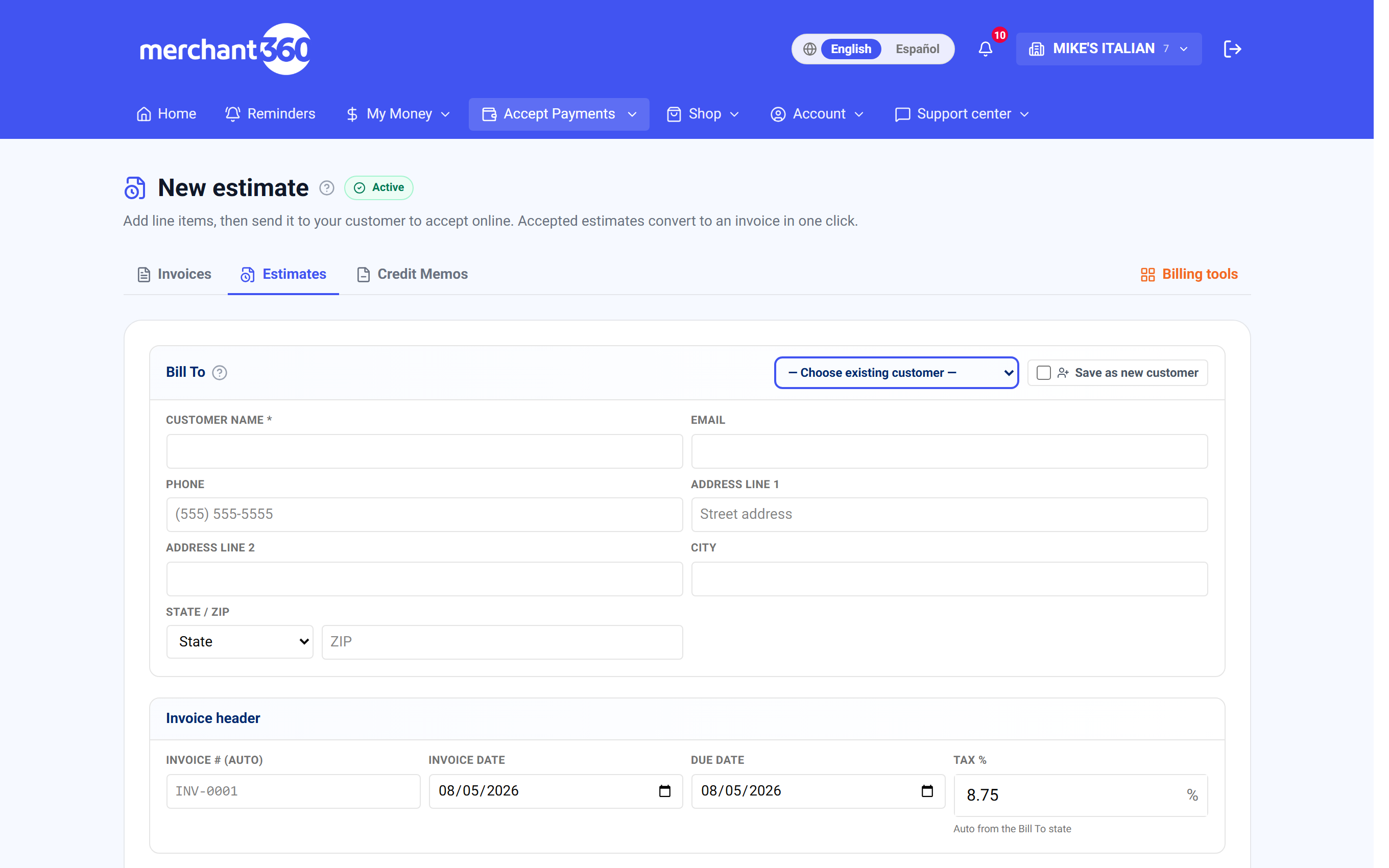
| On this screen | What it does |
|---|---|
| Bill To | Choose existing customer or type a new one; Save as new customer keeps them in your directory. |
| Line items | From catalog or Free-text / service, with Description, Qty, Unit price, Discount, and the taxable checkbox. |
| Due date | The date the quote is good through. After it, the estimate shows Expired. |
| Tax | auto from the Bill To state, with Override and Reset to auto. |
| Customer-facing notes (optional) | Terms or scope notes shown on the estimate. |
| Require a deposit to accept? | Deposit type: No deposit, Flat amount ($), Percent of total (%), or paid in full. The form shows Customer pays X to accept. |
| Save Draft | Stores the estimate without sending. |
| Save & Send estimate | Emails the estimate with its review-and-sign link. Needs a customer email. |
| Estimate number prefix (Settings) | Under Invoice numbering & footer. New estimates number from your prefix. |
Estimates use the same editor as invoices – anything you can put on an invoice, you can quote.
Send it for signature
Sending emails the customer a secure link, with no login or account on their end. They review every line, the total, and your notes on a hosted page branded to your business. To accept, they agree to the electronic-signature consent, type their full legal name, and sign on-screen. Merchant360 records the signature, the name, the consent, the timestamp, and the IP address so it holds up.
If you asked for a deposit, they pay it as part of accepting, by card or (if enabled) by bank. The deposit posts to the invoice the estimate converts into, so the balance invoice they receive already shows it paid.
You can resend from the estimate page with Resend estimate, adding a Personal note that goes at the top of the email, or copy the Public estimate link and send it any way you like. The page shows how many days the estimate has been waiting since it was sent, and a follow-up reminder is emailed to you while it waits.
Done looks like this: you are notified the moment the customer accepts or declines, the estimate's status changes on your board, and the activity log records Estimate accepted & signed with the deposit if one was paid.
If the customer cannot open the link, the estimate may be Expired (past its good-through date) or Void; resend it with a new date. If the email failed, the page says so and the link is refreshed for you to copy and send yourself. Customers can decline from the same page with a reason, which shows on the estimate.
- 1Sending emails the customer a secure link, with no login or account on their end.
- 2They review every line, the total, and your notes on a hosted page branded to your business.
- 3To accept, they agree to the electronic-signature consent, type their full legal name, and sign on-screen. Merchant360 records the signature, the name, the consent, the timestamp, and the IP address so it holds up.
- 4If you asked for a deposit, they pay it as part of accepting, by card or (if enabled) by bank.
| On this screen | What it does |
|---|---|
| Resend estimate | Emails the review-and-sign link again. Personal note (optional) adds a message at the top. |
| Public estimate link / Copy link | The customer's link, to paste into a text or another email. |
| Waiting N days since sent | How long the estimate has been open. Not sent to the customer yet shows on a draft. |
| Deposit required to accept | Shown on the estimate page when a deposit is set; the customer pays it while signing. |
| Review page (customer) | Every line, the total, notes, the e-signature consent checkbox, a full legal name field, the signature pad, and the deposit payment when required. |
| Decline (customer) | Marks the estimate Declined with an optional reason you see on the page. |
You're notified the moment a customer accepts or declines, and the estimate's status updates on your board.
Track, accept & convert to an invoice
The board's four counters show Open (awaiting a response), Accepted (customer approved), Declined, and All-time. Search by estimate number, customer, or email, page through, and Export CSV for your records. Each estimate carries a status: Draft, Sent, Accepted, Declined, Expired, Converted, or Void.
When a customer signs and accepts online, the estimate converts to an invoice automatically and the balance invoice is emailed to them. There is nothing more for you to do; View the invoice on the estimate page opens it.
Accepting over the phone or in person instead? Open the estimate and click Mark accepted, then Convert to invoice to create the bill. Every line carries over. Mark declined records a no. Internal notes on the estimate page are for your team only and carry onto the invoice when it converts.
Done looks like this: the estimate shows Converted, the new invoice number is linked from the estimate page, and the invoice collects payment the usual ways: a pay link, a card on file, or the Virtual Terminal.
If Convert to invoice is greyed out, the estimate is not Accepted yet; use Mark accepted first. A declined or expired estimate is not a dead end: Duplicate it into a fresh draft, adjust the pricing or scope, and send a new quote. Void removes an estimate you no longer want the customer to see.
- 1When a customer signs and accepts, the estimate converts to an invoice automatically and the balance invoice is emailed to them. There's nothing more for you to do.
- 2Accepting over the phone or in person instead? Open the estimate and click Mark accepted, then Convert to invoice to create the bill. Every line carries over, so you never re-key anything.
- 3That invoice collects payment the usual ways: a pay link, a card on file, or the Virtual Terminal.
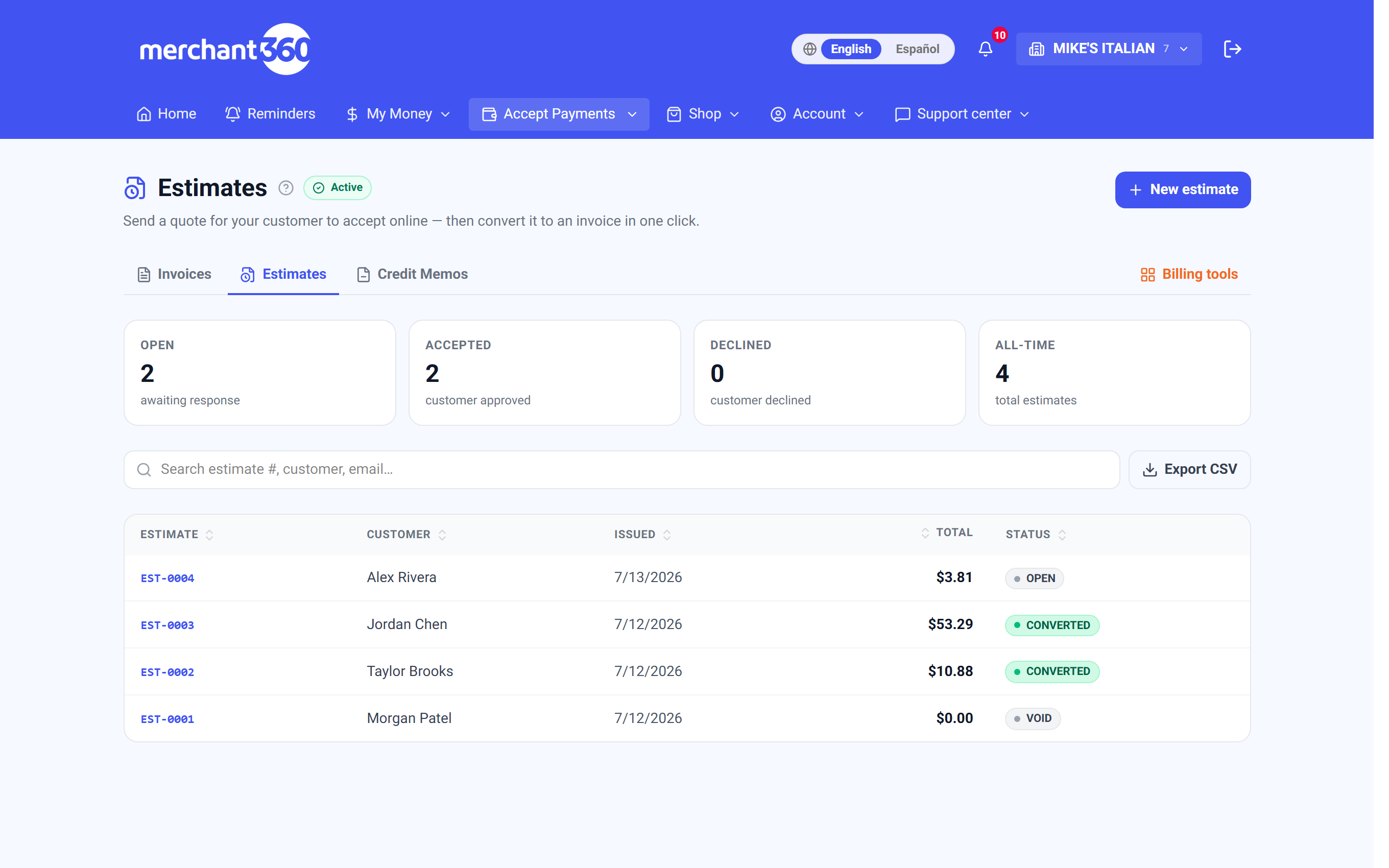
| On this screen | What it does |
|---|---|
| Open / Accepted / Declined / All-time | The board counters. |
| Search / Export CSV | Filters by estimate number, customer, or email; downloads the current list. |
| New estimate | Opens the builder. |
| Status pill | Draft, Sent, Accepted, Declined, Expired, Converted, or Void. |
| Mark accepted | Records acceptance taken by phone or in person and unlocks Convert to invoice. |
| Mark declined | Records a decline. |
| Convert to invoice | Creates the invoice with every line carried over. The estimate shows Converted and links to the invoice. |
| View the invoice | Opens the invoice an estimate converted into. |
| View customer | Opens the customer's profile. |
| Internal notes | Team-only notes with Save notes. They carry onto the invoice. |
| Duplicate | Copies the estimate into a fresh draft to revise and resend. |
| Void | Cancels the estimate and its link. |
| Activity | Created, sent, resent, accepted and signed, declined, converted, and follow-up reminders. |
A declined estimate isn't a dead end. Duplicate it into a fresh draft, adjust the pricing or scope, and send a new quote.