
Reservations & rentals
Take a deposit at booking, charge the balance to the card on file on a date, and hold a security amount you can charge against with evidence.
- What a reservation is
- Rental units: your rate and your availability
- Weekend and seasonal rates
- Availability at a glance
- Create a reservation
- What your customer sees
- The balance and the hold run themselves
- Move a reservation to other dates
- Let customers change their own dates
- Change the length of a stay
- Cancellation policy and refunds
- Reinstate a cancelled reservation
- Charge against the hold
- The reservation page and the Security holds report
- Online booking: let customers reserve from your website
- Reservation settings and your agreement
What a reservation is
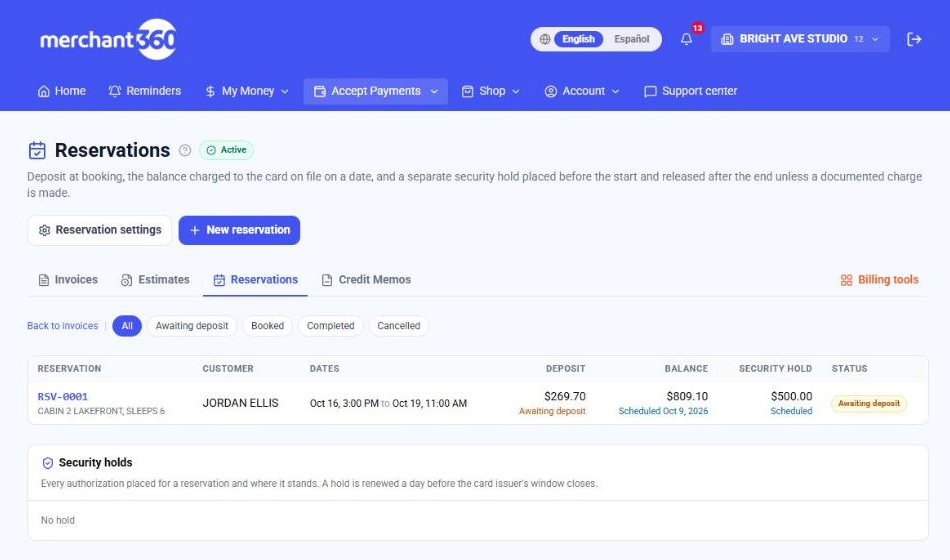
A reservation is an invoice with three money steps. The customer pays a deposit at booking, the remaining balance is charged to the same card on a date you set, and a separate security hold is placed on the card shortly before the start date and released after the end date unless you charge against it. Use it for rentals of any kind: rooms and units, cars, boats, snowmobiles, equipment, event space.
Rental units: your rate and your availability
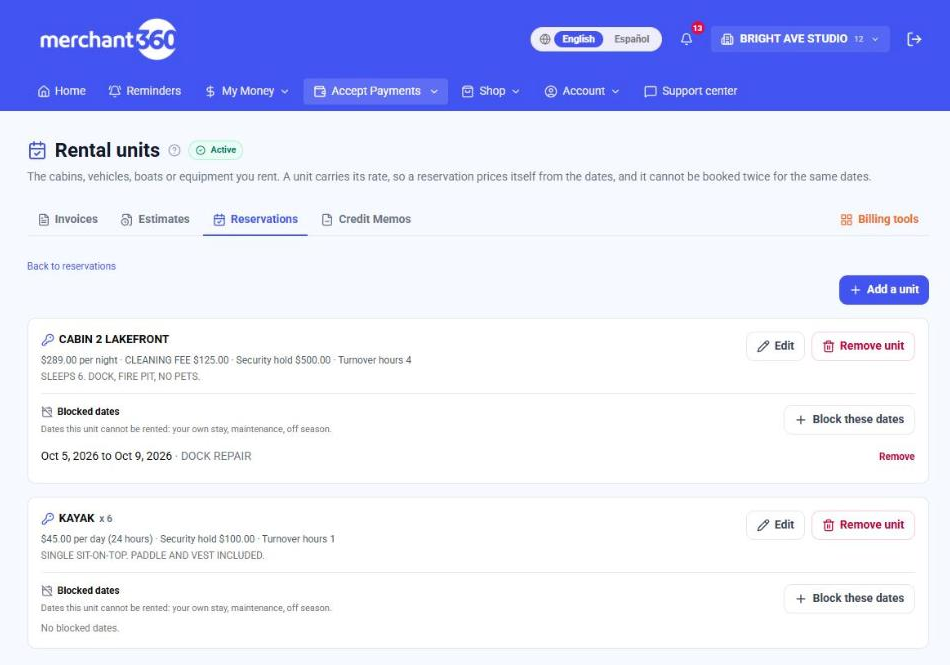
A rental unit is the thing you rent: a cabin, a boat, a skid steer, a set of kayaks. Set it up once under Reservations → Rental units and two things happen from then on. The reservation prices itself, because the unit carries your rate and the form counts the nights, days or hours from the dates. And the unit cannot be booked twice for the same dates, because every new reservation is checked against the ones already on it.
On the New reservation form, pick the unit first, then the dates. The reserved item, the security hold and the charge lines fill in from the unit, and a line under the dates tells you whether it is free. If it is already reserved or you blocked those dates, the form says which reservation is in the way and the Create button stays off. You can still edit the charge lines for a booking that is priced differently; once you edit one, the form stops rewriting them.
A reservation holds the unit from its start until its end plus the unit's turnover hours, so a cabin with 4 turnover hours that checks out at 11 AM cannot check in again before 3 PM. A reservation still waiting for its deposit holds the dates too, because your customer already has the link. Cancel or delete it to free them.
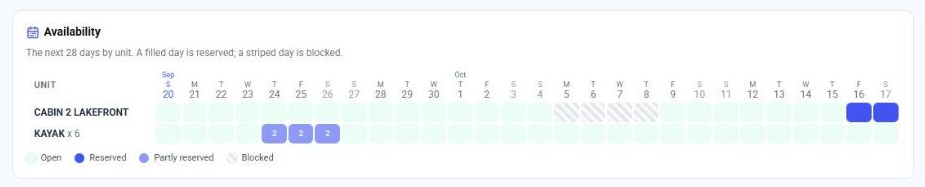
The Reservations page shows Availability for the next 28 days, one row per unit: open days, reserved days and blocked days, with the reservation one click away. If you use Scheduling, the same rentals appear as a Rentals strip above your appointment board for the week you are looking at. Rentals do not take a staff slot and never block an appointment.
| On this screen | What it does |
|---|---|
| Rate / Priced | Your price and what it is per. Per night counts calendar nights (Friday 3 PM to Monday 11 AM is 3 nights). Per day counts started 24-hour periods. Per hour counts started hours. |
| How many you have | 1 for a one-of-a-kind unit. For identical units rented by count, like 6 kayaks, enter the count; the form then asks how many and availability counts them. |
| Minimum stay / Maximum stay | The shortest and longest booking the unit accepts, in the same nights, days or hours as the rate. |
| Turnover hours | Time the unit stays unavailable after each reservation ends, for cleaning, refuelling or inspection. |
| Flat fee / Fee name | One fixed charge added to every reservation on this unit as its own line, such as a cleaning fee. |
| Security hold | This unit's hold amount. Leave it blank to use your default from Reservation settings. |
| Add photos | Uploads JPG, PNG or WebP photos of the unit, up to 8 per unit and 8 MB each. They show on your online booking page and on the customer's reservation page. The first photo is the cover: use Make cover or the arrows under a photo to reorder them. Type a caption under a photo (Dock at sunset, Bunk room) and it shows beneath the photo on the booking page; it saves when you click away. The small x on a photo removes it. |
| Block these dates | Takes the unit out of service for your own stay, maintenance or the off season. A block cannot be placed over dates that are already reserved. |
| Remove unit | Stops offering the unit. Reservations already made on it are kept. |
Set up the unit before you take the next booking for it. Reservations you typed by hand earlier are not attached to a unit, so they do not show on the Availability grid and do not protect those dates.
Weekend and seasonal rates
One rate is rarely the whole story. A rental unit can carry a weekend rate and any number of seasonal rates, and a reservation is priced night by night (or day by day) from them. A Thursday to Monday stay at $289 a night with a $349 weekend rate comes out as one weekday night, two weekend nights and one more weekday night, each on its own line so your customer can see how the total was built.
The weekend rate applies to the days you mark as your weekend. For a unit priced per night, mark the nights that cost more: Friday and Saturday nights is the usual lodging weekend, because those are the nights a weekend guest sleeps there. For a unit priced per day, mark the days.
A seasonal rate is a date range with its own price: July 4th week, summer, the off season. Inside a season its rate replaces the everyday rate. If you give the season its own weekend rate, that replaces your weekend rate inside the season; if you leave it blank, the season rate covers weekends too. When two seasons overlap, the shorter one wins, so a holiday week set inside a summer season is priced as the holiday week. A season can also require a longer minimum stay than the unit normally does, such as five nights over a holiday.
Units priced per hour take the rate of the day the booking starts on. Rates never change a reservation you already made: a reservation keeps the price it was booked at.
| On this screen | What it does |
|---|---|
| Weekend rate | The price for the days marked as your weekend. Leave it blank to charge the same rate every day. |
| Weekend is | The days the weekend rate applies to. For nightly units these are the nights billed, so Friday and Saturday covers a Friday to Sunday stay. |
| Add a season | Opens the season form under the unit: a name, the first and last date, the rate, an optional weekend rate and an optional minimum stay. |
| Remove (season) | Deletes the season. Dates inside it go back to your everyday and weekend rates. Reservations already made are not repriced. |
The season name prints on the charge line, for example CABIN 2, 5 NIGHTS (JULY 4TH WEEK). Name seasons the way you would want a customer to read them.
Availability at a glance
The Availability card on the Reservations page covers the next 28 days, one row per unit. A solid day is fully reserved, a lighter day with a number means that many of a multi-unit row are out, a striped day is blocked, and everything else is open. Click a reserved day to open its reservation.
A day counts as reserved when any part of it is covered, so both the check-in day and the check-out day are filled. Turnover hours are not drawn on the grid, but they are enforced when the next booking is made.
Create a reservation
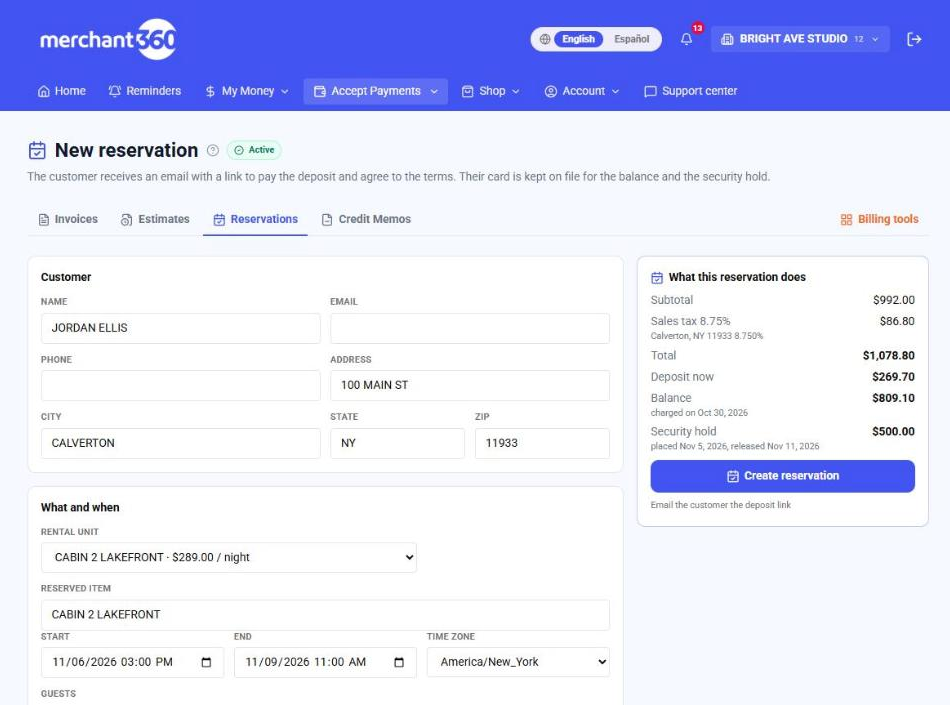
Reservations has its own row in the Tools menu (Accept Payments → Reservations) and in the Invoicing group, a card on the Billing Tools hub, and a Reservations button at the top of the Invoices and Estimates pages. Click New reservation. Enter the customer, what is reserved and the start and end times, the charge lines, and the three money settings: the deposit (a percent, a fixed amount, or the full amount), how many days before the start the balance is charged, and the security hold amount with its place and release days. The panel on the right shows exactly what the reservation will do and on which dates.
| On this screen | What it does |
|---|---|
| Rental unit | Shown once you have rental units. Picking one fills the reserved item, the security hold and the charge lines from the unit's rate, and checks that it is free for the dates. Leave it on No unit to type everything yourself. |
| Reserved item | What the customer is reserving, in your words (CABIN 2, 24 FT PONTOON, SKID STEER). It prints on the email, the pay page and the receipt. |
| Start / End | The reservation window. The balance date, the hold date and the release date are all counted from these two. |
| Add a line | Adds a charge line (nights, cleaning fee, delivery). The lines add up to the reservation total, and they become the lines of the invoice. |
| Deposit at booking | Percent of total, Fixed amount, Full amount or No deposit. This is the only amount the customer pays when they open the link. |
| Charge the balance this many days before the start | Sets the date the rest is charged to the card on file. 0 charges it on the start date. |
| Security hold | The pre-authorization amount, with the days before the start it is placed and the days after the end it is released. Leave the amount at $0.00 for no hold. |
| Charge the deposit now to a card on file | Lists the customer's saved cards. Pick one and the deposit is charged when you create the reservation; no email step. |
| Email the customer the deposit link | On by default when no card is picked. The customer gets the pay link by email. |
| Create reservation | Creates the invoice and the reservation together and opens the reservation page. |
What your customer sees
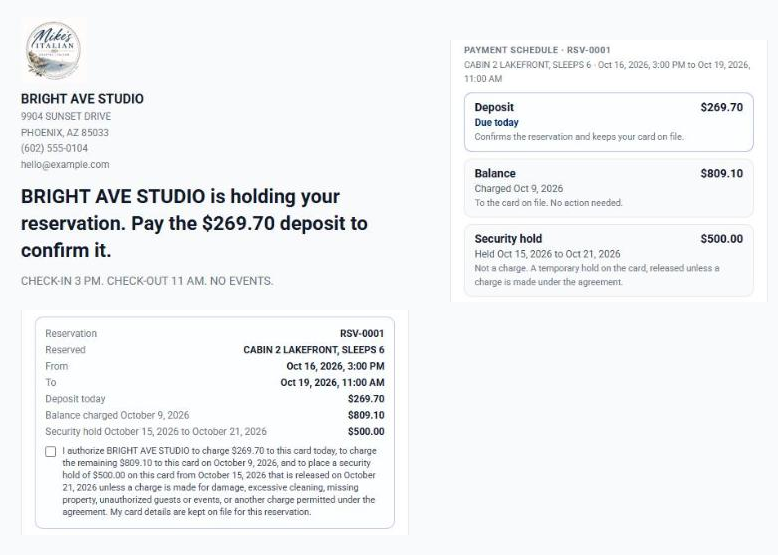
The customer receives an email with a link. On that page they see the deposit due today, the balance amount and date, the hold amount and window, and your rental agreement, and they must tick the box to agree before the deposit charges. Their card is then kept on file for this reservation. If the customer's card is already on file, pick it on the form and the deposit is charged immediately with no email step.
The balance and the hold run themselves
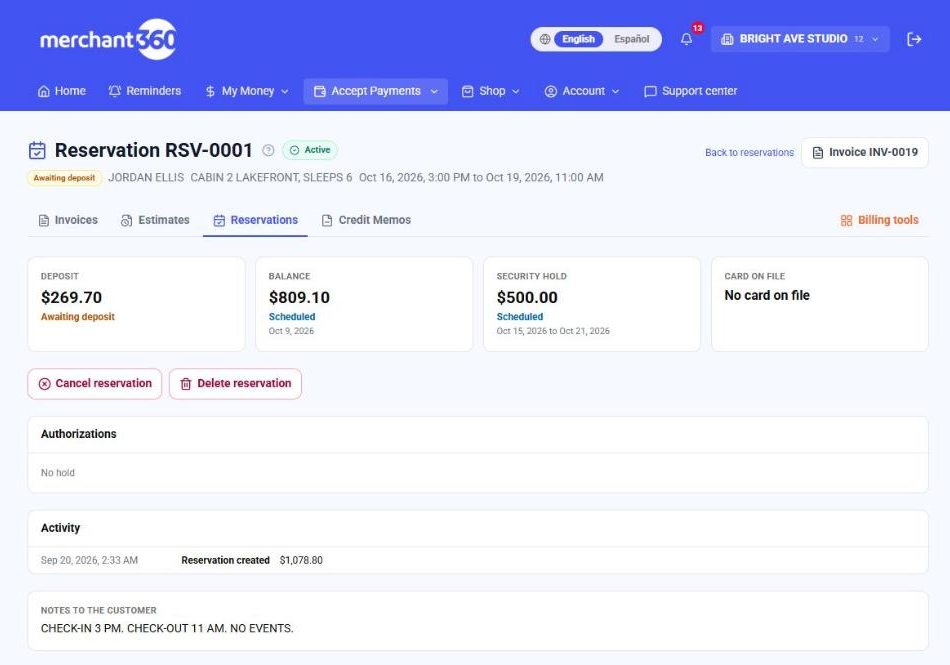
From then on the reservation runs itself. Three days before the balance date the customer gets a reminder; on the date the balance is charged and both of you get a receipt. If the card declines, the customer gets a pay link and the charge is retried on a short schedule; you are told when it gives up. The security hold is placed on its date and renewed automatically one day before the card issuer's window closes (30 days for lodging and vehicle rental categories, 7 days for most others), so it never lapses during a long stay. After the end date it is released and the customer is told.
Move a reservation to other dates
Plans change. Open the reservation and click Move dates to give it a new start and end, and if you like a different rental unit. The new dates are checked against the unit exactly the way a new booking is, so you cannot move a reservation on top of another one or into dates you blocked. The reservation's own dates do not count against it, so shifting a stay by a day or two works even when it overlaps its old dates.
Moving never changes the money. The total, the deposit already paid and the balance stay as they were, because that is the price your customer agreed to. What moves is the schedule: the balance date and the security hold's place and release dates are recalculated from the new dates, keeping the same number of days before and after. A hold that is already on the card keeps running and only its release date moves.
If the new dates would cost more or less at today's rates, the page tells you the difference after the move so you can decide what to do about it. To actually charge a different price, cancel the reservation and book it again. A reservation that is completed, cancelled, or has already had a charge made against its hold cannot be moved.
When the reservation has an email on file, the customer is sent the new dates, the previous dates and the re-dated charges. Untick the box in the Move panel to move it quietly. Every move is written to the reservation's Activity timeline with the old and new dates.
| On this screen | What it does |
|---|---|
| Move dates | Opens the Move panel on the reservation page with the current dates filled in. |
| Rental unit | Moves the reservation to another unit. The reserved item printed on emails and receipts changes to the new unit's name. |
| Email the customer the new dates | On by default when there is an email on file. The message lists the previous dates, the new dates, and the balance and hold dates. |
| Move reservation | Checks the unit one more time and saves. Disabled while the new dates are taken. |
Let customers change their own dates
With Customer rescheduling on, every confirmation email carries a Manage your reservation button. It opens the customer's own page for that reservation: what they booked, when, the payment schedule, a button to pay the deposit if it is still unpaid, Change your dates, and your cancellation policy with a Cancel this reservation button when your policy allows cancelling online. Turn it on under Reservations → Reservation settings → Customer rescheduling. It is off until you turn it on.
The customer picks one thing: a new start date. The unit, how many, the length of the stay and the check-in and check-out times stay exactly as booked, so moving three nights to the following week takes two clicks and turning three nights into five is still a call to you. Days the unit is taken are crossed out, and the move is checked against the unit the same way your own moves are, so a customer can never move onto another booking or into dates you blocked.
The price never changes on a move, so the page protects you from a cheap booking sliding into expensive dates. A date is only offered if the stay would cost the same or less there at today's rates than it does on the booked dates. Moving a weekday stay onto a holiday week, or onto weekend nights when you charge a weekend rate, is refused with a note to contact you. Moving to cheaper dates is allowed and the price stays as booked.
You set two limits. Changes close a number of hours before the start (72 unless you change it), and one reservation can be moved online a set number of times (2 unless you change it). A reservation that is completed, cancelled, or has had a charge made against its hold cannot be moved online. When a customer moves, the balance date and the hold dates move with the stay, they get the new-dates email, you get an email saying who moved and from when to when, and the move is on the reservation's Activity timeline.
| On this screen | What it does |
|---|---|
| Let customers change their own dates | Turns the Change your dates section on for your customers, and adds the Manage your reservation button to confirmation and date-change emails. |
| Hours before the start when changes close | Inside this window the customer's page tells them to contact you instead. |
| Times a customer may move one reservation | Counts online moves by the customer only. Moves you make do not count. |
| Customer's page (on a reservation) | The link to that customer's page, shown on the reservation while customer rescheduling is on. Send it to a customer who lost the email. |
Reservations made before you set up rental units are not attached to a unit, so there is nothing to check availability against and their page asks the customer to contact you.
Change the length of a stay
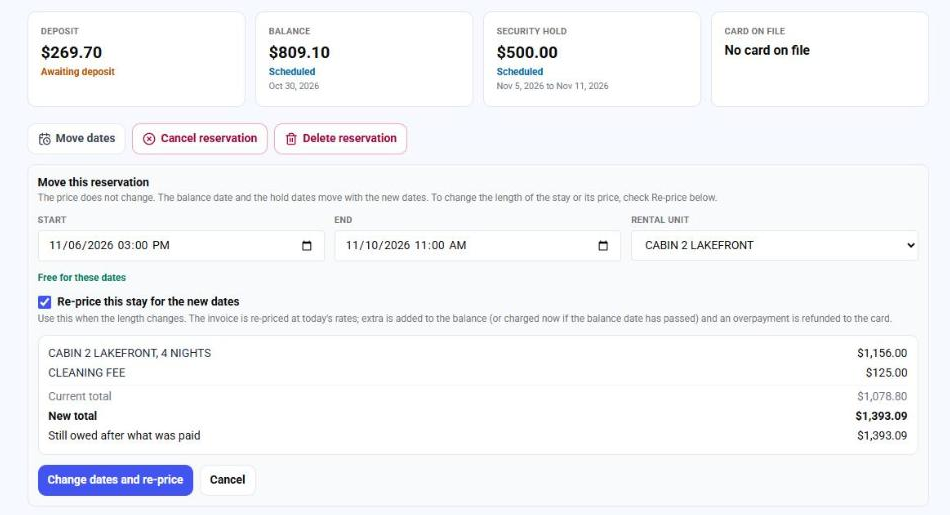
Moving a reservation keeps its price. When the length changes, the price should change too. Open the reservation, click Move dates, set the new start and end, and tick Re-price this stay for the new dates. Before anything happens you see the new charge lines, the current total, the new total, and what that means for the money.
The reservation's invoice is re-priced in place at today's rates, with your weekend and seasonal rates applied night by night and the same sales tax rate the invoice already carries. Lines you added yourself, such as firewood or a late check-out, are kept exactly as billed. The customer never gets a second invoice and the deposit they paid stays on it.
A longer stay adds the difference to the balance, charged on the balance date. If the balance date has already passed, the card on file is charged right away; if it declines, the customer is emailed a link to pay and the usual retries run. A shorter stay lowers what is still owed first, and anything the customer has paid beyond the new total is refunded to their card.
Some reservations cannot be re-priced automatically: one you priced by hand rather than from a rental unit's rate, one with a discount, or one with catalog items on it. For those, cancel and book the new dates. You can also let customers change the length themselves, under Customer rescheduling. They see the new price before they confirm. A longer stay simply adds to their balance. A shorter stay is only offered online while your cancellation policy still refunds in full; after that it is a call to you, so shortening can never be used to get around your policy.
| On this screen | What it does |
|---|---|
| Re-price this stay for the new dates | In the Move panel. Shows the new lines and totals for the dates you typed and switches the button to Change dates and re-price. Leave it unticked to move the dates at the same price. |
| Change dates and re-price | Re-prices the invoice, moves the dates, balance date and hold dates, then charges or refunds the difference and emails the customer the new dates and total. |
| Let customers change the length of their stay too | In Customer rescheduling. Customers pick new first and last days instead of only a new start. |
Cancellation policy and refunds
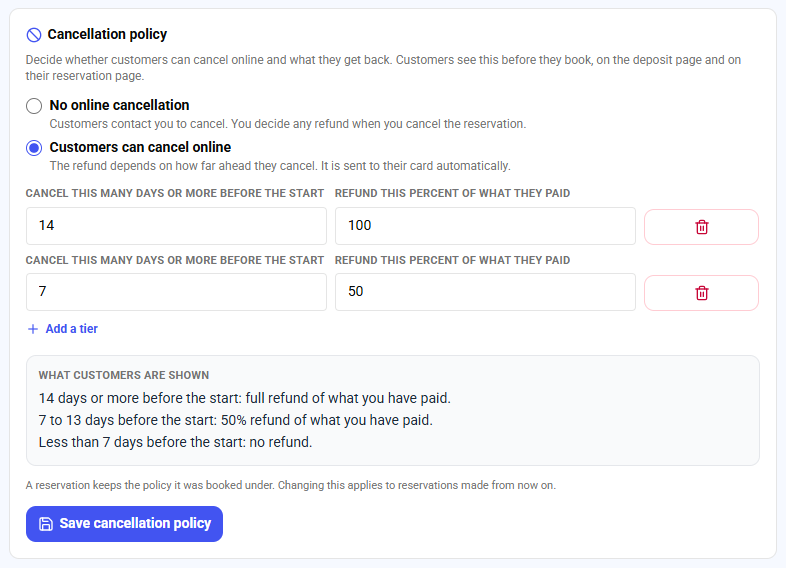
You decide what a cancellation costs. Under Reservations → Reservation settings → Cancellation policy, choose one of two things. No online cancellation means customers contact you to cancel and you decide any refund when you cancel the reservation. Customers can cancel online means they can cancel from their own reservation page, and the refund depends on how far ahead they cancel.
For online cancellation you write the rules as tiers: cancel this many days or more before the start, get this percent of what you paid back. Two tiers of 14 days at 100% and 7 days at 50% read to your customer as: 14 days or more before the start, full refund; 7 to 13 days, 50%; less than 7 days, no refund. A partial day does not count, so 13 days and 23 hours out is 13 days. For a non-refundable booking, allow online cancellation with no tier above 0%. The box under the tiers shows the exact sentences your customers will read.
Customers see the policy three times: on your online booking page before they book, on the deposit page above the box they tick to accept your agreement, and on their reservation page. A reservation keeps the policy it was booked under. If you change the policy in March, a customer who booked in February is still held to, and protected by, the February policy.
The refund is a percent of what the customer has actually paid so far, the deposit plus the balance if it was already charged. It goes back to the card automatically, newest charge first, and the customer gets an email saying how much. The security hold is released first. When you cancel a reservation yourself, the Cancel panel shows what the policy refunds right now and fills that amount in; you can change it to refund more, less, or nothing.
Sometimes a refund cannot be sent automatically: it is over your refund verification limit, which needs a code only you can enter, or the payment is too old to refund without the card. The reservation is still cancelled and the dates still open up. The amount is shown in red on the reservation as owed to the customer, it is on the Activity timeline, and you get an email. Send it from Transactions and it is done.
| On this screen | What it does |
|---|---|
| No online cancellation | Customers see: Reservations cannot be cancelled online. To cancel, contact the business. You handle each cancellation and its refund yourself. |
| Customers can cancel online | Adds a Cancel this reservation button to the customer's reservation page and refunds by your tiers. |
| Cancel this many days or more before the start / Refund this percent of what they paid | One tier. Add up to five. They are sorted for you, most days first. Later than your last tier refunds nothing. |
| What customers are shown | The policy written out exactly as it appears to customers. |
| Refund to the card (on the Cancel panel) | What goes back to the card when you cancel. Filled in from the reservation's policy; change it up to the amount paid, or set 0 for no refund. |
Turn on Customer rescheduling too if you would rather customers move than cancel. A customer who can shift their dates in two clicks often keeps the booking.
Reinstate a cancelled reservation
A cancelled reservation is not gone. If the customer calls to say they still want it, or wants to pay after an online booking lapsed, open the reservation and click Reinstate reservation. It comes back with the same number, dates, price and invoice, so nothing has to be typed again.
The dates are checked again first. If someone else booked them after the cancellation, the reservation stays cancelled and you are told the dates are no longer free; create a new reservation for other dates. A reservation cannot be reinstated once its dates have started, or when money was refunded for the cancellation. In that case create a new reservation, so the record of what the customer paid stays accurate.
The invoice that was voided with the reservation is restored, and the customer pays the deposit on the same invoice page as before. Tick Email the customer that it is reinstated and they get a message with the Pay the deposit button. A balance that was still to be charged and a security hold that was still to be placed are scheduled again.
An online booking whose deposit is still unpaid gets a new hold period, starting from the moment you reinstate it, with the same warning and the same automatic cancellation if it is not paid. A reservation you created yourself does not lapse on its own.
- 1Open the cancelled reservation.
- 2Click Reinstate reservation and read what it will do.
- 3Leave the email box ticked to send the customer the link to pay.
- 4Click Reinstate reservation again to confirm.
| On this screen | What it does |
|---|---|
| Reinstate reservation | Shown on a cancelled reservation whose dates have not started and that had no refund. |
| Email the customer that it is reinstated, with the link to pay | Sends the customer the reinstatement notice and, when the deposit is unpaid, the pay button. |
| Reinstated (activity) | The entry recorded on the reservation, with who did it. |
Charge against the hold
To charge for damage, excessive cleaning, missing property, unauthorized guests or events, or another charge the agreement allows, open the reservation and click Charge against the hold. Enter the amount (up to the hold), pick the reason, describe what happened, and attach photos or receipts. The amount is captured from the hold, the rest of the hold is released, and the customer receives a receipt naming the reason and listing the documentation on file. A hold can be charged once.
The reservation page and the Security holds report
Everything is on the reservation page: the three legs and their status, the card on file and the agreement the customer accepted with its timestamp, every authorization placed for the hold (when it was placed, when it renews, when the issuer window ends), claims with their evidence, and a timeline of every step. The Reservations list also has a Security holds report across all reservations. Charge the balance now, place or release the hold now, waive the balance, or cancel from the same page. Cancelling releases any live hold and waives the balance; refund the deposit from the invoice if your agreement calls for it.
| On this screen | What it does |
|---|---|
| Charge the balance now | Charges the remaining balance to the card on file today instead of waiting for the balance date. |
| Place the hold now | Places the security hold today instead of waiting for its date. |
| Release the hold | Reverses the live authorization. The customer is told the hold is gone. |
| Charge against the hold | Opens the claim form. One claim per hold; whatever you do not charge is released. |
| Move dates | Moves the reservation to other dates or another unit. The price does not change; the balance date and the hold dates move with it. |
| Waive the balance | Marks the balance as not owed, with your reason. Nothing is charged on the balance date. |
| Cancel reservation | Releases any live hold, waives the balance and voids the invoice if it is unpaid. A paid deposit stays paid until you refund it from the invoice. |
| Delete reservation | Shown only while no money has moved: no deposit paid, no hold placed, no claim. Removes the reservation and its invoice. |
Online booking: let customers reserve from your website
Online booking gives you a public page where a customer picks one of your rental units, picks dates on a calendar that already crosses out the days that are taken, sees the price built from your weekend and seasonal rates, and continues to pay the deposit. Turn it on under Reservations → Reservation settings → Online booking. You get a link to share and a snippet to embed the page on your own website.
The customer's price and payment schedule come from your settings: the deposit, the balance date and the security hold use your Reservation settings defaults, and a unit's own hold amount when it has one. Sales tax is added once they type their ZIP. When they continue, the reservation is created and they land on the same deposit page your emailed links open, where they read your rental agreement, tick the box and pay. The booking then appears in Reservations marked Booked online, and you get an email.
An online booking holds its dates only while the customer is paying. If the deposit is not paid within the time you set (60 minutes unless you change it), the booking cancels itself, its pay link stops working and the dates open up again. This is what keeps an abandoned booking, or a bot, from blocking your calendar. A reservation you create yourself is different: it holds its dates until you cancel it.
The customer is kept informed while the clock runs. When a quarter of the time is left (45 minutes into a 60 minute hold, 3 hours into a 4 hour hold, 3 days into a 4 day hold) they are emailed that the reservation will be cancelled if still unpaid, with a button to pay the deposit. If the time runs out, they are emailed that the reservation was not confirmed and the dates were released, with a Book again button and a note that you can reinstate it. On the reservation's page you see the same deadline: Booked online. The dates are held until a date and time.
Dates on the page are read in your time zone, and nightly units use the check-in and check-out times on the unit. Untick Show on my online booking page on a unit to keep it for bookings you enter yourself. The page never shows who has a unit, only that the days are taken.
| On this screen | What it does |
|---|---|
| Let customers book online | Turns the public page on. The link is created the first time you turn it on and stays the same if you turn it off and on again. |
| Your time zone | The zone customer-picked dates and check-in times are read in. |
| Minutes an unpaid online booking holds its dates | How long a customer has to pay the deposit before the booking cancels itself. 5 to 1440. |
| Message at the top of the page | A few lines customers see first: house rules, what is included, how to reach you. |
| Copy link / Open the page | Your booking link, to put in emails, texts and social profiles. |
| Embed on your website | Two lines to paste into your site where the booking page should appear. The widget sizes itself to the page as the customer moves through the steps, so there is no inner scrollbar. Add data-unit with a unit's id to open it on that unit, for a Book this cabin button on a page about one unit. Payment always opens on the full page, outside the frame. |
Save your rental agreement in Reservation settings before you turn this on. It is what every online customer accepts before they pay.
Reservation settings and your agreement
Defaults and the agreement text live under Reservations → Reservation settings. Set the card issuer window override there if your business qualifies for the 30-day window under a category other than lodging or vehicle rental.
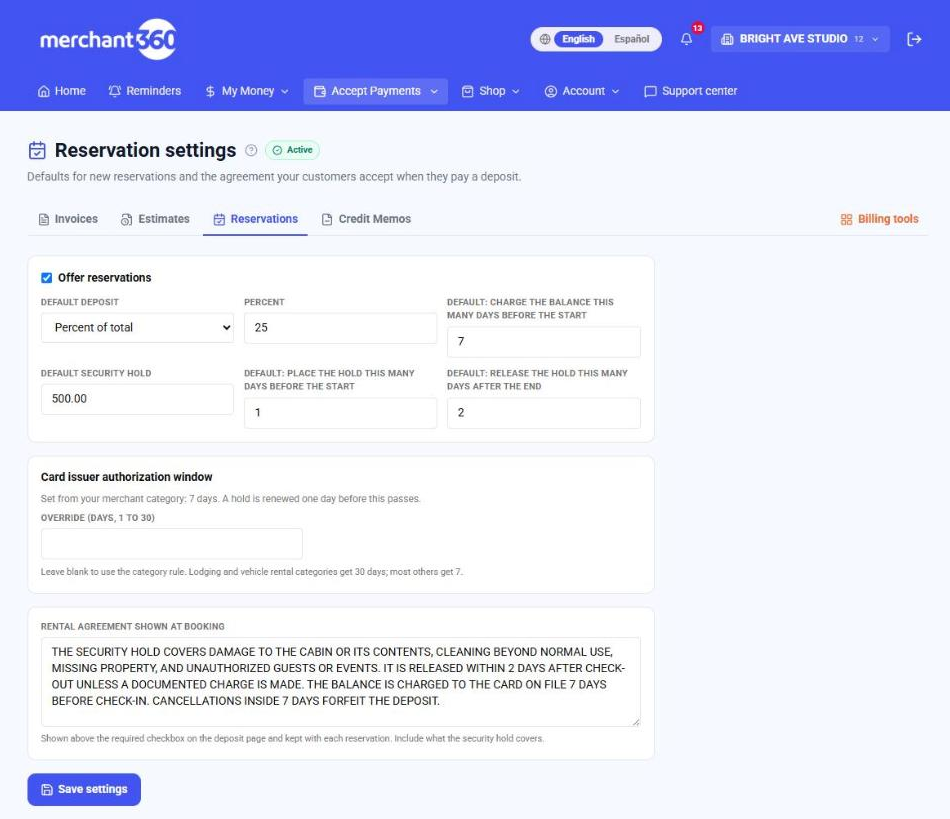
The security hold is a pre-authorization, not a charge: nothing moves to your account unless you make a claim. Keep the agreement text specific about what the hold covers, because that text is what the customer accepted.