
Messages, marketing & referrals
Talk to your EPI team in-app, turn happy customers into reviews, stay ahead of your to-dos, and earn for referrals.
Messages – your line to Electronic Payments
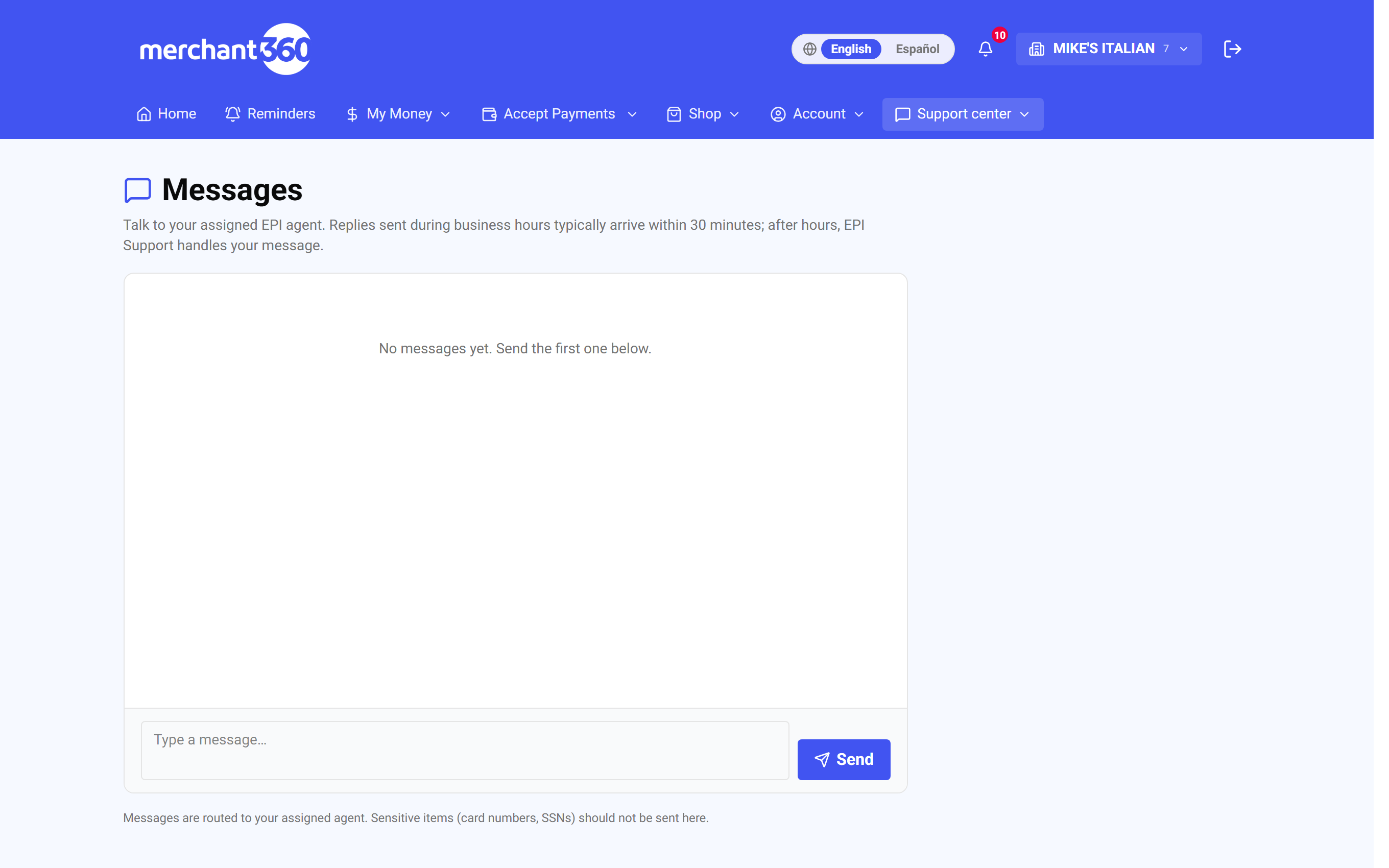
Messages is a single running conversation between your business and your Electronic Payments team, with no ticket numbers and no digging through email. It lives on the Support page. Type a question and your assigned agent replies right in the thread; replies sent during business hours typically arrive within 30 minutes, and after hours EPI Support handles your message.
Use it for anything account-related: a batch question, a supply request, help setting up a feature. Because the whole history stays in one thread, whoever picks it up on our side sees the full context. Do not send card numbers or Social Security numbers here; sensitive items are collected through secure forms instead.
The Support page also offers a support ticket for anything that needs follow-up with email updates, a chat assistant, a department directory with direct phone lines, and your sales agent's details for pricing, equipment, and account questions.
A different Messages page, under Customers in the billing tools, is for texting your own customers. Turn on customer texting there to send two-way texts and see replies. Payment-link and reminder texts always send regardless of that switch.
If no reply arrives, check that the message shows Sent rather than Failed to send, and try again. If your customer's replies do not appear on the customer Messages page, no dedicated texting number has been assigned yet; your rep can provision one.
| On this screen | What it does |
|---|---|
| Messages (Support page) | The thread with your assigned EPI agent. Type a message and click Send. |
| Type a message / Send | Writes and sends your message. The status shows Sending, then Sent. |
| Open a support ticket | For anything that needs follow-up. You are emailed on every update. |
| Chat with us | Instant answers from the assistant, or a live person during business hours. |
| Call us / Department directory | Direct lines so you reach the right team the first time. |
| Your sales agent | Contact details for pricing, equipment, or account questions. |
| Requests & Orders | Tracks equipment orders and service requests. |
| Customer Messages: Turn on customer texting / Turn off | Enables two-way SMS with your customers. Off by default. |
| New message: Customer name, Mobile number, message, Send | Starts a text conversation with a customer. |
| Conversation list | Every customer thread. Select a conversation to read and reply. |
Review requests – turn good visits into stars
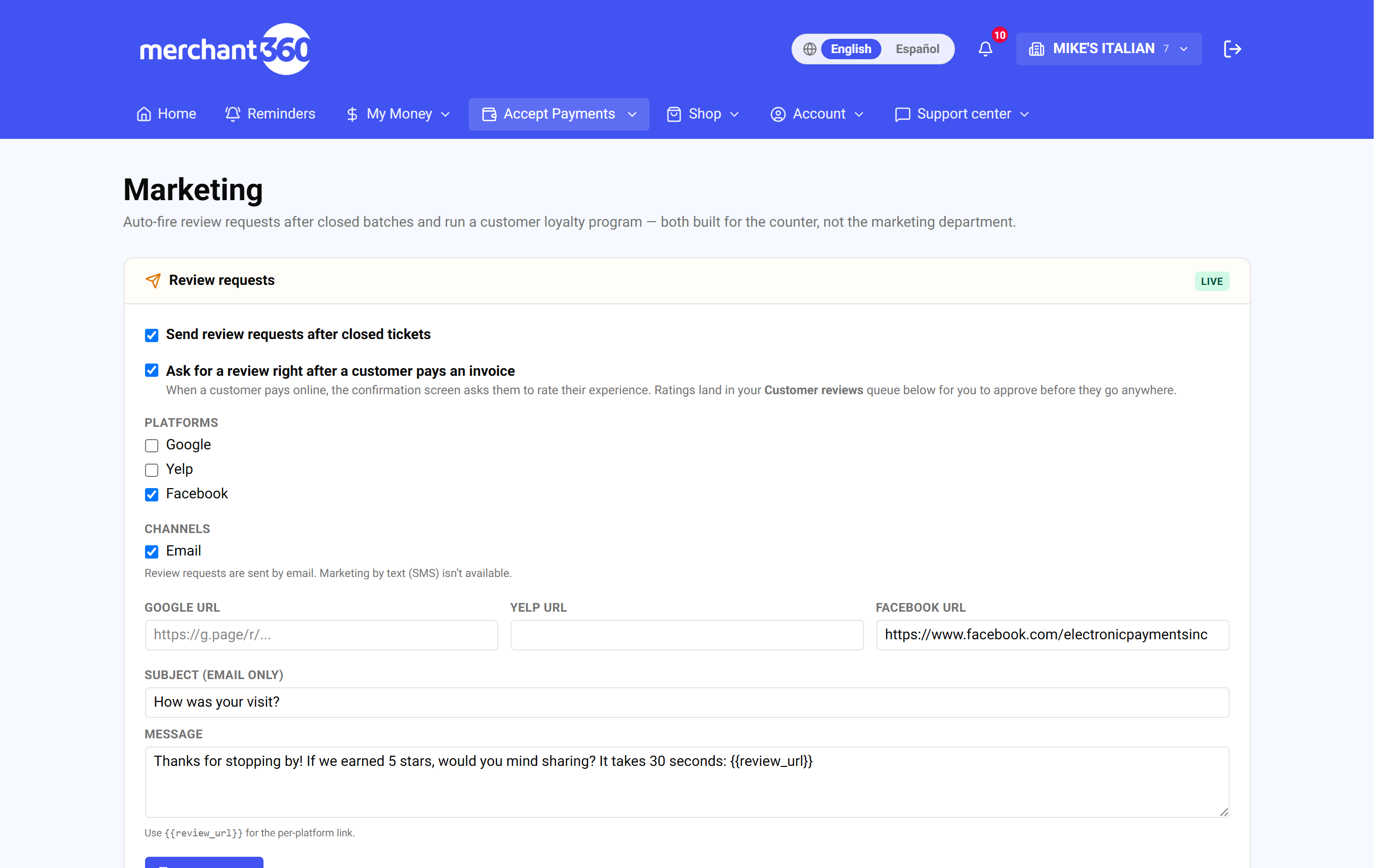
Under Marketing, turn on Ask for a review right after a customer pays. From then on, when a customer pays an invoice, a payment link, or any online payment form, the thank-you screen thanks them and shows your review links. Add the links for the sites you care about, starting with Google.
The same screen asks for a private 1 to 5 rating. That one comes straight to you and is never posted anywhere. You will find those under Customer reviews on the same page, where you can approve or reject each one for your own records.
You can also add your review links to the receipt email that goes out after a purchase. That is a separate switch, and it is off until you turn it on.
There is a second way to ask: turn on Send review requests after closed tickets and the morning after your batch closes, that day's customers get one email asking for a review. Two limits are worth knowing. Only customers who paid through an invoice, a payment link, or an online form can be reached, because a swiped card carries no email address. And each customer is asked at most once every 90 days, however often they buy from you.
Every one of those emails carries an unsubscribe link. If a customer uses it, that address stops receiving review requests and marketing from you, immediately and permanently. Receipts and invoices still reach them, because those are records of a payment they made rather than marketing. Reviews live on Google, Yelp, and Facebook, written by the customer from their own account. Nobody, including us, can edit or take down a public review from inside Merchant360.
Done looks like this: the Review requests badge reads Live, a test payment ends on a thank-you screen with your links, and Recent review requests shows entries as Queued, then Sent.
If no requests go out, check the badge reads Live and that at least one review link is saved. If a customer says they were asked twice, the second was more than 90 days later or came from the receipt switch. If a customer shows Unsubscribed, they opted out and cannot be re-added from here.
- 1Open Marketing and tick Ask for a review right after a customer pays.
- 2Paste your Google, Yelp, and Facebook review URLs.
- 3Optionally tick Send review requests after closed tickets and Include review links in the payment receipt email, edit the Subject and Message, and click Save settings.
- 4Click Send a sample request to see the email yourself, then watch Recent review requests.
| On this screen | What it does |
|---|---|
| Review requests: Live / Off | The badge that shows whether any request goes out. |
| Ask for a review right after a customer pays | Shows your review links and the private rating on the thank-you screen after invoice, payment-link, and online-form payments. |
| Send review requests after closed tickets | Emails the day's customers the morning after your batch closes, at most once per customer every 90 days. |
| Include review links in the payment receipt email | Adds your links to the receipt. Off until you turn it on. |
| Google / Yelp / Facebook URL | The pages customers are sent to. Start with Google. |
| Subject / Message | The wording of the review-request email. |
| Save settings | Applies every switch and link on the page. |
| Send a sample request | Emails you the request so you can see what customers get. |
| Queue request | Queues a request to one customer by hand. |
| Recent review requests: Queued / Sent / Unsubscribed | What went out and to whom. Unsubscribed addresses are never emailed again. |
| Customer reviews: Approve / Reject | Your private 1 to 5 ratings. Approving or rejecting is your own record keeping and changes nothing the customer saw. |
Every customer who pays sees the same review links, whatever they rate you. That is deliberate. Sending only your happy customers to Google is called review gating, it is against Google's review policies, and it can cost a business its review content. The private rating is how you hear about a bad visit, not a filter on who gets asked.
Reminders – one list of what needs attention
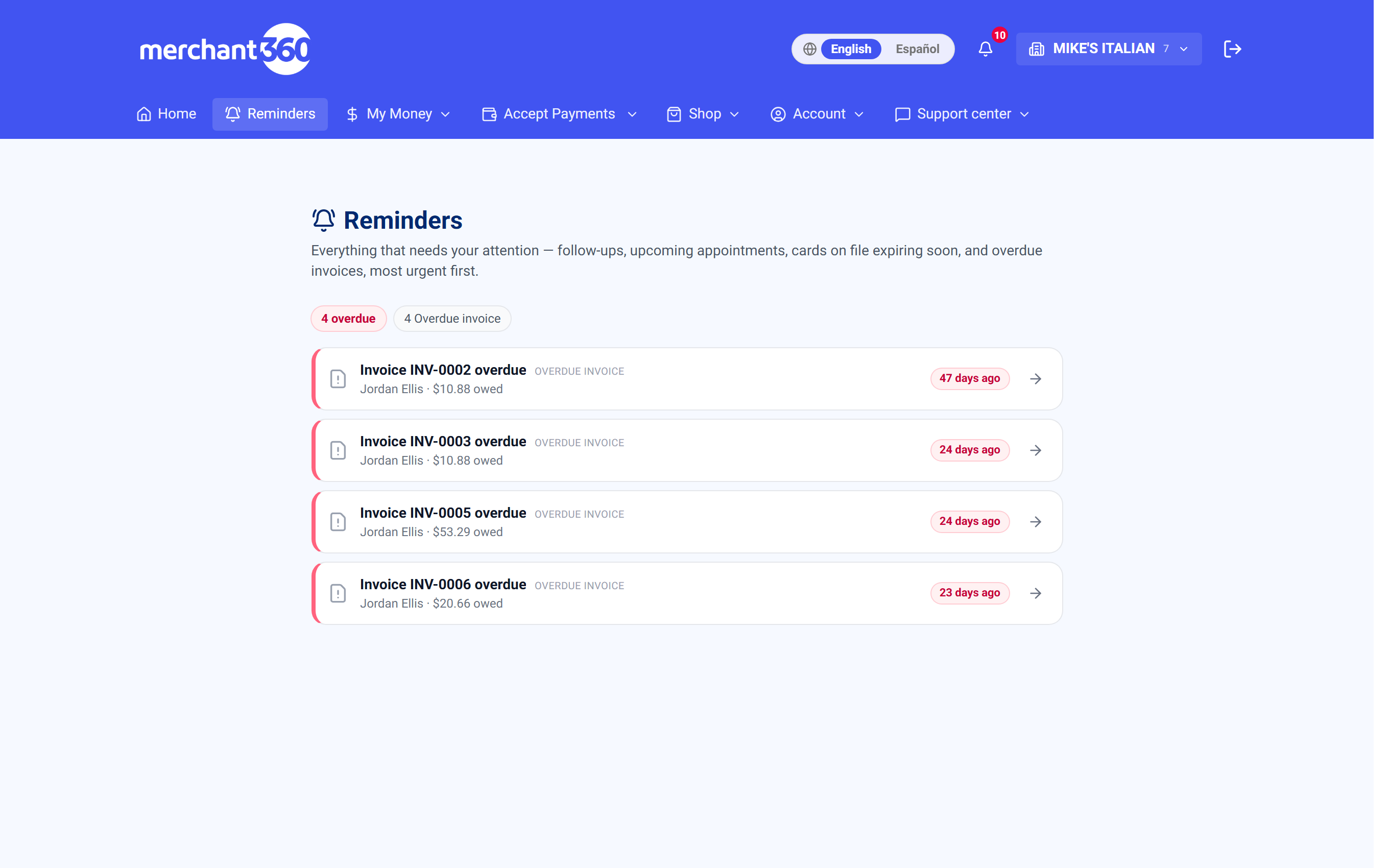
The Reminders center pulls everything that needs a human into one prioritized feed: follow-up tasks you have set on customers, upcoming appointments, cards on file that are about to expire, and invoices going overdue. The most urgent item is at the top.
Each entry links straight to the thing itself. Tap an expiring card to request an update, tap an overdue invoice to send the reminder, tap an appointment to open the job. It is the start your day here page, and there is nothing to configure: follow-ups come from the customer record, appointments from Scheduling, and cards and invoices from your billing tools.
Done looks like this: the page reads You're all caught up.
If an item keeps coming back, use Mark done once it is handled rather than Snooze. If an overdue invoice is listed but was paid in cash, record the payment on the invoice and it drops off. If a follow-up is missing, add it on the customer's record.
| On this screen | What it does |
|---|---|
| Follow-up | A task you set on a customer. Opens the customer. |
| Appointment | An upcoming job from Scheduling. Opens the job. |
| Card expiring | A saved card about to expire. Opens the customer so you can request an updated card. |
| Overdue invoice | An unpaid invoice past its due date, with how long it is overdue. Opens the invoice to send a reminder. |
| Mark done | Clears the item from the feed. |
| Snooze 3 days | Hides the item and brings it back in three days. |
| You're all caught up | Shown when nothing needs attention. |
Refer & Earn
Know another business that should be processing with Electronic Payments? Submit them under Refer & Earn with a name and contact, and track the referral as it moves: Submitted, Contacted, Onboarding, and Active. When a referral becomes a merchant, you earn a referral bonus of up to $500.
You handle the introduction only. Our team handles the conversation, the pricing review, and the onboarding, and reaches out within one to two business days. Tell us what kind of business it is, who the right contact is, and what is bothering them about their current setup, because that is what gets the first call right.
Done looks like this: the referral appears in Your referrals with a status, In motion counts it while it is being contacted or onboarded, and Earned to date updates when the reward is paid.
If a referral shows Declined or Not eligible, the business chose not to proceed or did not qualify; you can still refer others. If nothing has changed in a week, message your agent from Support and mention the business name.
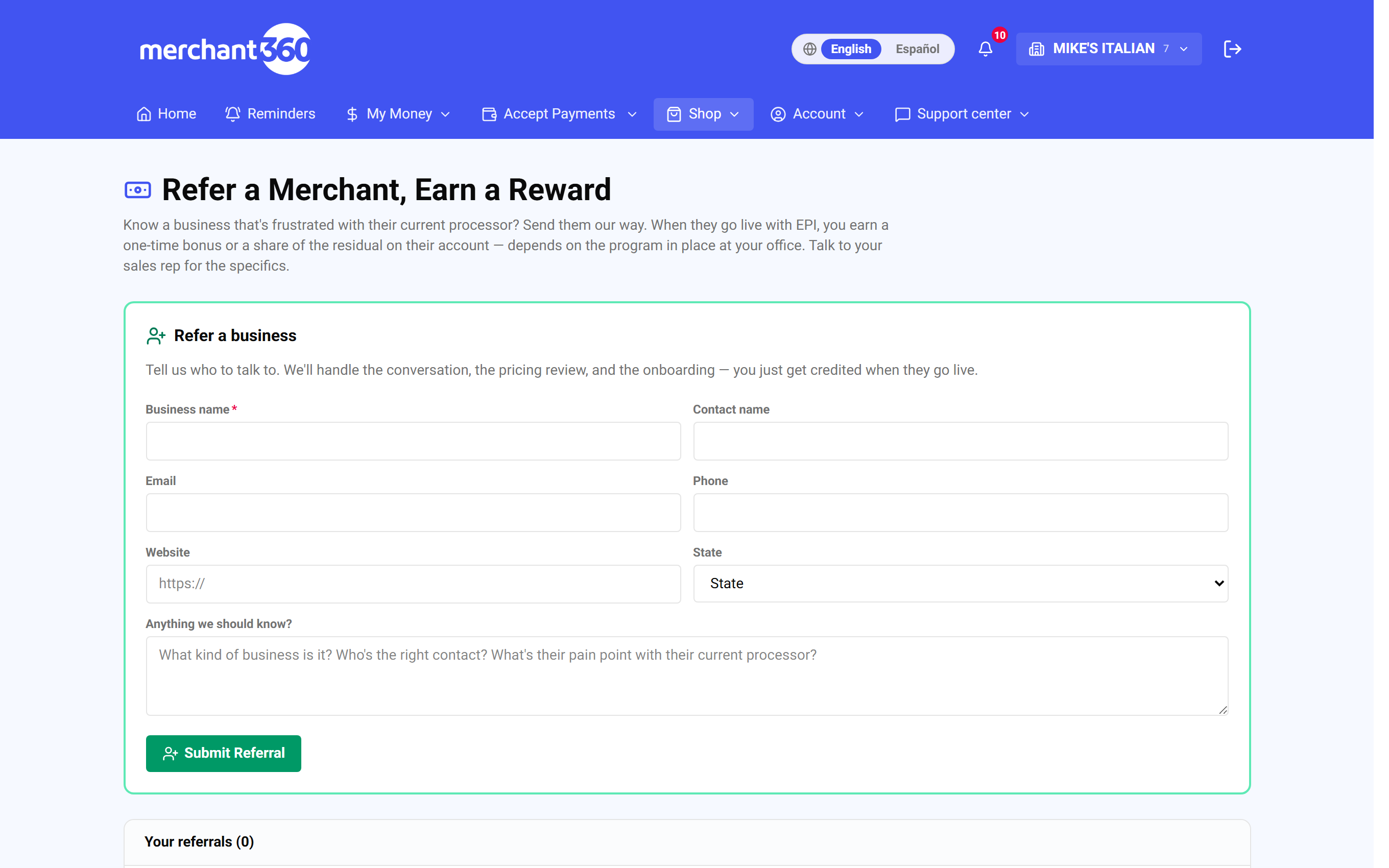
- 1Enter the business name, contact name, email, phone, website, and state.
- 2Add anything we should know, then click Submit Referral.
- 3Watch the status in Your referrals below.
| On this screen | What it does |
|---|---|
| Referrals submitted / In motion / Earned to date | The three tiles: how many you have sent, how many are being contacted or onboarding, and rewards paid so far. |
| Business name, Contact name, Email, Phone, Website, State | Who we should talk to. |
| Anything we should know? | The kind of business, the right contact, and their pain point with their current processor. |
| Submit Referral | Sends the referral. A confirmation says the team will reach out within 1 to 2 business days. |
| Your referrals: Business / Contact / State / Status / Reward / Submitted | Every referral you have sent with its current stage and reward. |
| Status | Submitted, Contacted, Onboarding, Active, Declined, or Not eligible. |
The best referrals are specific: the owner's name and cell beats a generic storefront address every time.